
GPS
available on iOS
Access to your iPhone's GPS functionality and more.
The simple display shows your current:
- Heading (where a compass is available).
- Course
- Speed
- Coordinates
- Altitude
Street and Topographic maps are available care of several different map providers including maps.google.com. and openstreetmap.org.
And trace statistics including:
- Time and Distance
- Minimum and Maximum Altitude
- Average and Maximum speed.
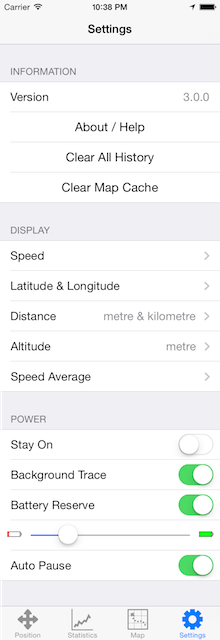
Via the settings you can:
- Choose between meters or feet and formats.
- Choosing Speed or Average Speed.
- Keep your iPhone awake.
- Trace while GPS is in the background.
- Automatically pause when you stop.
- Shutdown when the battery started getting low.

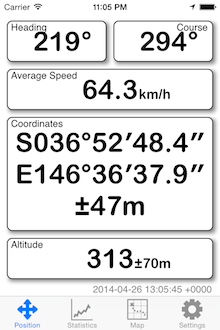
- Compass reading
- Travelling direction
- Speed (calculated average)
- Latitude (WGS 84)
- Longitude (WGS 84)
- Location Accuracy (distance)
- Height above sea level and accuracy
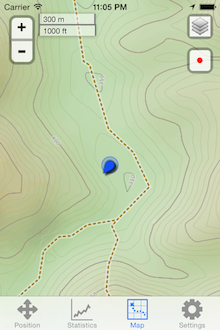
- Zoom controls
- Scale
- Map selection
- Follow control
- Location & heading
- Map provider
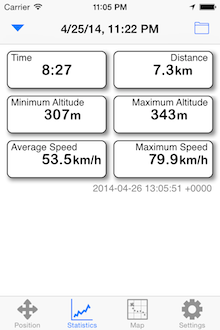
- Time & distance
- Minimum & maximum altitude
- Average & maximum speed
In the navigation bar:
- Extra trace controls
- Organise traces
Information
- The version of the application
- A link to this page
- Clear all recorded history and statistics
- Clear cached map tiles
Display (and calculations)
- Speed: Miles/Hour, Km/Hour or Knots
- Latitude & Longitude: Formats or UTM.
- Distances: Miles, Kilometres or Nautical miles
- Altitude: Feet or Meters
- Speed Average: Direct or averaged
Power
- Keep the application running when not touched.
- Continue a trace while in the background.
- Enable a reserve so the battery does not go completely flat.
- How much reserve should be kept.
- Automatically pause the trace when you stop.
Abbreviations
- f Feet
- m Meters
- mph Miles Per Hour
- kph Kilometres Per Hour
- kn Knots
- - - - Not available.
- ° Degrees
- ’ Minutes
- ” Seconds
- HH:MM:SS Time in Hours, Minutes and Seconds